A deep dive into Django Infra & Local Setup
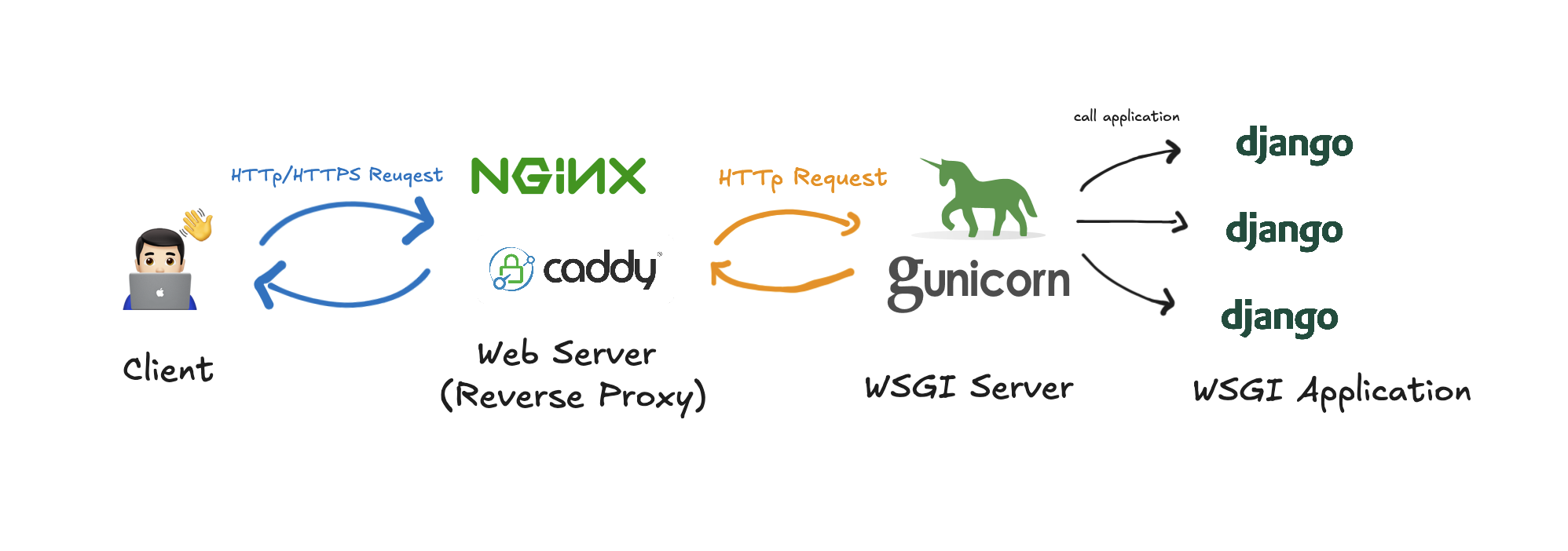
By dissecting Django infrastructure from the ground up,
I aim to understand what environments are required for the production environment,
and to build a structurally identical setup locally.
From the Ground Up: How manage.py runserver Works Internally
When running Django using the runserver[1], how is the server actually started ?
Looking into the Django source code[2] reveals that it relies on Python’s standard library, wsgiref.simple_server[3], to serve HTTP requests.
# https://github.com/django/django/blob/60fecd1d445224fa00385f5f1fde75999da7bec8/django/core/servers/basehttp.py#L251C1-L262C86
def run(
    addr,
    port,
    wsgi_handler,
    ipv6=False,
    threading=False,
    on_bind=None,
    server_cls=WSGIServer,
):
    server_address = (addr, port)
    if threading:
        httpd_cls = type("WSGIServer", (socketserver.ThreadingMixIn, server_cls), {})
In other word, runserver starts the server using something called WSGI.
Now, i need to understand what WSGI actually is.
WSGI
This document specifies a proposed standard interface between web servers and Python web applications or frameworks, to promote web application portability across a variety of web servers.
By contrast, although Java has just as many web application frameworks available, Java’s “servlet” API makes it possible for applications written with any Java web application framework to run in any web server that supports the servlet API.
In the Java ecosystem, the Servlet API defines a standard interface that allows web applications to run on any compliant web server.
Similarly, WSGI[4] defines a standard interface that enables communication between a Web Server/Gateway (e.g., Gunicorn) and a Web Application/Framework (e.g., Django).
The Application/Framework Side[5]
The application object is simply a callable object that accepts two arguments.
The specification defines an application as a callable object, which must accept environ and start_response as arguments.
It can be either a function or a class—any callable is acceptable as long as it conforms to the WSGI interface.
When an application only needs to return static responses, framework like Django is too “complex”.
In such cases, it is enough to define a callable object that follows the WSGI interface and serve it using a WSGI server implementation like Gunicorn.
If you see the default wsgi.py implementation provided by Django,
unsurprisingly it defines a callable object that conforms to the WSGI specification and accepts environ and start_response as arguments.
WSGI config for myproject project.

It exposes the WSGI callable as a module-level variable named ``application``.

For more information on this file, see
https://docs.djangoproject.com/en/6.0/howto/deployment/wsgi/
# https://github.com/django/django/blob/60fecd1d445224fa00385f5f1fde75999da7bec8/django/core/wsgi.py
def get_wsgi_application():
    """
    The public interface to Django's WSGI support. Return a WSGI callable.

    Avoids making django.core.handlers.WSGIHandler a public API, in case the
    internal WSGI implementation changes or moves in the future.
    """
    django.setup(set_prefix=False)
    return WSGIHandler()
# https://github.com/django/django/blob/60fecd1d445224fa00385f5f1fde75999da7bec8/django/core/handlers/wsgi.py#L113
class WSGIHandler(base.BaseHandler):
    request_class = WSGIRequest

    def __init__(self, *args, **kwargs):
        super().__init__(*args, **kwargs)
        self.load_middleware()

    def __call__(self, environ, start_response):
        # 중략

        start_response(status, response_headers)

        # 중략
The Server/Gateway Side[6]
Gunicorn is one of the most well-known open-source WSGI servers, and its implementation is easy to inspect.
When running Django with Gunicorn, a command like gunicorn myproject.wsgi is used.
The argument myproject.wsgi specifies the location of the WSGI application module, which Gunicorn imports.
In the sync worker, which is default worker in gunicorn, Gunicorn assigns the imported application to an instance variable named wsgi, and then invokes the application according to the WSGI specification by calling self.wsgi(environ, resp.start_response).
# https://github.com/benoitc/gunicorn/blob/master/gunicorn/app/wsgiapp.py#L46
    def load_wsgiapp(self):
        return util.import_app(self.app_uri)

# https://github.com/benoitc/gunicorn/blob/master/gunicorn/util.py#L358
def import_app(module):
    parts = module.split(":", 1)
    if len(parts) == 1:
        obj = "application"
    else:
        module, obj = parts[0], parts[1]

    try:
        mod = importlib.import_module(module)
# https://github.com/benoitc/gunicorn/blob/56b5ad87f8d72a674145c273ed8f547513c2b409/gunicorn/workers/sync.py#L177C1-L177C63
    def handle_request(self, listener, req, client, addr):
        environ = {}
        resp = None
        try:
            self.cfg.pre_request(self, req)
            request_start = datetime.now()
            resp, environ = wsgi.create(req, client, addr,
                                        listener.getsockname(), self.cfg)

            # 중략

            **respiter = self.wsgi(environ, resp.start_response)**
Expose to WSGI(gunicorn) to Public Network ?
If you take a closer look at the Gunicorn documentation, you’ll find that when using only the default sync worker, it is recommended to run Gunicorn behind a proxy such as Nginx.
If you exposed synchronous workers to the internet, a DOS attack would be trivial by creating a load that trickles data to the servers. https://docs.gunicorn.org/en/latest/design.html
The default Sync workers are designed to run behind Nginx which only uses HTTP/1.0 with its upstream servers. If you want to deploy Gunicorn to handle unbuffered requests (ie, serving requests directly from the internet) you should use one of the async workers. https://docs.gunicorn.org/en/21.2.0/faq.html#why-is-there-no-http-keep-alive
If an async worker is used, is a reverse proxy like Nginx still necessary ?
Responsibility of Reverse Proxy
It is important to clearly separate the responsibilities of a reverse proxy such as Nginx from those of Gunicorn.
A reverse proxy is responsible for handling TLS termination and mitigating security concerns such as IP spoofing, as well as filtering or rejecting requests that should not reach the web application server for various reasons.
If Gunicorn is exposed directly to the public network, it must handle all these security concerns on its own.
Instead, it is more robust to delegate these responsibilities to an expert such as Nginx, and configure the application to generally trust requests forwarded by the reverse proxy.
In Django, settings such as SECURE_PROXY_SSL_HEADER, along with Gunicorn’s forwarded_allow_ips, are used to trust that HTTPS has already been handled by the proxy.
For this reason, only the reverse proxy should be exposed to the public network, ensuring that all incoming requests pass through it.
To achieve a structurally identical setup in a local environment, a reverse proxy is therefore required as well.
Caddy - Setup Reverse Proxy for local
To build such an environment locally, the required components can be summarized as follows.
A good fit for reverse proxy that is responsible for TLS termination and handling various security concerns.
Caddy is that one, as it handles many security-related concerns out of the box and automates TLS configuration by default.
It provides sensible defaults for settings that would otherwise need to be manually configured when using Nginx, making it easy to use locally with minimal setup.
In this setup, Caddy only needs to act as a reverse proxy.
# Caddyfile
{
    debug
}

localhost:8080 {
    reverse_proxy localhost:8000 {
      header_up X-Forwarded-Proto https
    }
}
This Caddyfile configuration forwards requests coming into localhost:8080 to localhost:8000, and sets the X-Forwarded-Proto header to indicate that the original request was made over HTTPS.
Django(w. gunicorn) do not handle HTTPS directly; instead, they trust the requests forwarded by Caddy.
# settings.py
SECURE_PROXY_SSL_HEADER = ('HTTP_X_FORWARDED_PROTO','https')
ALLOWED_HOSTS = ["localhost","127.0.0.1"]
With this setup alone, HTTPS requests sent to port 8080 complete the TLS handshake at Caddy and are then forwarded upstream to Gunicorn, achieving a certain level of structural parity with a production environment.

Closing
Starting from runserver, step by step—from WSGI to Gunicorn and finally to the reverse proxy.
Rather than simply configuring things “because the Django docs say so” or “because the Caddy docs say so” and stopping at “it works”,
understanding the overall architecture will significantly accelerate future engineering decisions.
Leave a comment